:.: Dendrite
Hello, so what is Dendrite?, well I get lazy and I will just paste what they describe on their website:
Dendrite is a second-generation Matrix homeserver written in Go. It intends to provide an efficient, reliable and scalable alternative to Synapse:

    Efficient: A small memory footprint with better baseline performance than an out-of-the-box Synapse.
    Reliable: Implements the Matrix specification as written, using the same test suite as Synapse as well as a brand new Go test suite.
    Scalable: Runs at any scale, from single-user single-process monolith deployments up to massive multi-process (or even multi-machine) polylith deployments.
But wtf is Matrix, noup, not the movie:
Matrix is an open standard and communication protocol for real-time communication. It aims to make real-time communication work seamlessly between different service providers, in the way that standard Simple Mail Transfer Protocol email currently does for store-and-forward email service, by allowing users with accounts at one communications service provider to communicate with users of a different service provider via online chat, voice over IP, and videotelephony. It therefore serves a similar purpose to protocols like XMPP, but is not based on any existing communication protocol.

From a technical perspective, it is an application layer communication protocol for federated real-time communication. It provides HTTP APIs and open source reference implementations for securely distributing and persisting messages in JSON format over an open federation of servers. It can integrate with standard web services via WebRTC, facilitating browser-to-browser applications.
So as I said on my previous article about honk, I am using my little rock64 machine to build all these little self-hosted services. Of course the machine runs OpenBSD (-current) and it's rock solid so far and the load over it, it's pretty low, so I like it a lot.
I installed Dendrite over Synapse basically because it's smaller and simpler, plus I didn't want to maintain something really big, I just wanted it to have my own secure chat service and play around with it.
Do we have a port of it? of course, thanks to the amazing abieber@, keep in mind that we need to install PostgreSQL too, so we start with the usual.
:. Package install
# pkg_add dendrite postgresql-server:. Dendrite Monolith
Dendrite has 2 types of "modes"; Monolith and Polylith, because I like it small and simple, I will use the Monolith mode:
Monolith mode runs all components in a single process. Components communicate through an internal NATS server with generally low overhead. This mode dramatically simplifies deployment complexity and offers the best balance between performance and resource usage for low-to-mid volume deployments.Packages installed, I will skip the initial db setup since you have it pretty clear explained here: /usr/local/share/doc/pkg-readmes/postgresql-server, just follow the steps and with the db engine running we can continue with the dendrite's dbs.
:. Database
Creating the db role and the db itself:
# su _postgresql -c "createuser -P dendrite"
... SECRET STUFF ...
# su _postgresql -c "createdb -O dendrite -E UTF-8 dendrite"
... MORE STUFF ...
In case you want to create separate dbs for each service that dendrite consumes you can do the follow:
# for i in appservice federationapi mediaapi mscs roomserver syncapi keyserver userapi; do
	su _postgresql -c "createdb -O dendrite -E UTF-8 dendrite_$i"
done
But let's keep it simple and just go on with it, now that you have the db information such as db name, usr and password, you need to set that in the dendrite's conf file (/etc/dendrite.yaml), like:
# grep post /etc/dendrite.yaml
    connection_string: postgresql://dendrite:cd9f087745037460b96eaf@127.0.0.1/dendrite?sslmode=disable
If you decide the for separated dbs, you should adjust the files as follows:
...
# Configuration for the Sync API.
sync_api:
  internal_api:
    listen: http://127.0.0.1:7773
    connect: http://127.0.0.1:7773
  external_api:
    listen: http://10.0.0.71:8073
  database:
    connection_string: postgresql://dendrite:cd9f087745037460b96eaf@127.0.0.1/dendrite_syncapi?sslmode=disable
    max_open_conns: 10
    max_idle_conns: 2
    conn_max_lifetime: -1

# Configuration for the User API.
user_api:
  internal_api:
    listen: http://127.0.0.1:7781
    connect: http://127.0.0.1:7781
  account_database:
    connection_string: postgresql://dendrite:cd9f087745037460b96eaf@127.0.0.1/dendrite_userapi?sslmode=disable
    max_open_conns: 10
    max_idle_conns: 2
    conn_max_lifetime: -1
  device_database:
    connection_string: postgresql://dendrite:cd9f087745037460b96eaf@127.0.0.1/dendrite_device?sslmode=disable
    max_open_conns: 10
    max_idle_conns: 2
    conn_max_lifetime: -1
...
:. Dendrite setup
Server & client name, is what we need first is our new dendrite server, in my case m.x61.sh:
# grep m.x61.sh /etc/dendrite.yaml
  server_name: m.x61.sh
  well_known_server_name: "m.x61.sh:443"
  well_known_client_name: "m.x61.sh:443"
Let the port specified there, it will be use by your client to connect to your matrix server later on.
Generating signing keys, as probably anything now, we need them and it will be used to authenticate federation requests and events.
# mkdir /etc/dendrite/key
# cd /etc/dendrite/key
# dendrite-generate-keys --private-key matrix_key.pem
... OPENSSL MAGIC...
# grep matrix_key.pem /etc/dendrite.yaml
# signing key, use "./bin/generate-keys --private-key matrix_key.pem".
private_key: /etc/dendrite/key/matrix_key.pem
#  - private_key: old_matrix_key.pem
As we are using monolith mode we can use the built-in NATS Server rather than running a standalone. I am not expecting to use much of a storage so I didn't modify that paremetre but if you need it, please do.
  jetstream:
    addresses:
    disable_tls_validation: false
    storage_path: ./
    topic_prefix: Dendrite
I want this server for my own, so I don't need registrations (be carefule if you enable it, can lead to a lot of spam and other problems), I disabled it. The tricky part here was because I didn't find in any documentation telling me to set a "registration_shared_secret" to make my only user works. Unless you want to people be able to register on your dendrite you just can do this:
client_api:
  registration_disabled: true
  guests_disabled: true
  registration_shared_secret: "2dae02jd932h8fhj938hrjhj374ee337d461b"
  enable_registration_captcha: false
  recaptcha_public_key: ""
  recaptcha_private_key: ""
  recaptcha_bypass_secret: ""
  recaptcha_siteverify_api: ""
Where I have "2dae02jd932h8fhj938hrjhj374ee337d461b" you should put a very-super-long password, don't use mine, it's already taken.
Finally let's just enable and fix a path for our logs:
logging:
  - type: std
    level: info
  - type: file
    level: info
    params:
      path: /var/log/dendrite
Important thing, we need an user or two, you can create an admin and a regular one, or both in one, an example of using dendrite-create-account to create a normal account:
# dendrite-create-account -config /etc/dendrite.yaml -username gonzaloAn example to create an admin account:
# dendrite-create-account -config /etc/dendrite.yaml -username gonzalo -adminBe aware sometimes you need to specify the url of your server, in our case we can do:
# dendrite-create-account -config /etc/dendrite.yaml -username gonzalo -admin -url https://10.10.0.34:8448These are the basic configurations and it will make your server go on, I suggest to read a bit further the documentation and adjust the server to your needs, they have tons here.
:. Networking
As I wrote on my honk setup, dendrite is behind a relayd server, so I adjusted relayd's conf to take care of dendrite:
table   <matrix>        { 10.10.0.34 }
table   <certs>        { 127.0.0.1 }
...
http protocol "http" {
...
	## let's take care of the certs
	match request quick path "/.well-known/acme-challenge/*" tag "certs"
	pass request quick tagged "certs" forward to <certs>
...
	match request header "Host" value "m.x61.sh" tag "matrix"
	match request path "/_matrix/*" tag "matrix"
	pass request tagged "matrix" forward to <matrix>
...
	tls keypair "m.x61.sh"
...
}

relay "https" {
...
	forward to <matrix> port 8448 check tcp
	forward to <certs> port 3080 check tcp
...
}
The first match rule will take care of the "/.well-known/acme-challenge/*" path and send it to a local httpd, the other match rule will take care of the dendrite traffic and send it to the rock64.
As you can see on the relay chunk of relayd's conf, dendrite is listening on port 8448, we need to open that port in our pf to let our server speak with the others matrix servers:
...
## Dendrite
pass in on $isp inet proto tcp from any \
	to $isp port 8448 rdr-to $rock64 port 8448
For the final step we'll setup the ports of our dendrite daemon, if your server it directly expose to the internet, you can just skip the internal IP:
# grep dendrite /etc/rc.conf.local
dendrite_flags="-config /etc/dendrite.yaml -http-bind-address 10.10.0.34:8448 -https-bind-address 10.10.0.34:8448"
pkg_scripts=honk postgresql dendrite
:. Turn it on
We are done! Turn it on, and let's check if it works with a public Matrix Federation Tester
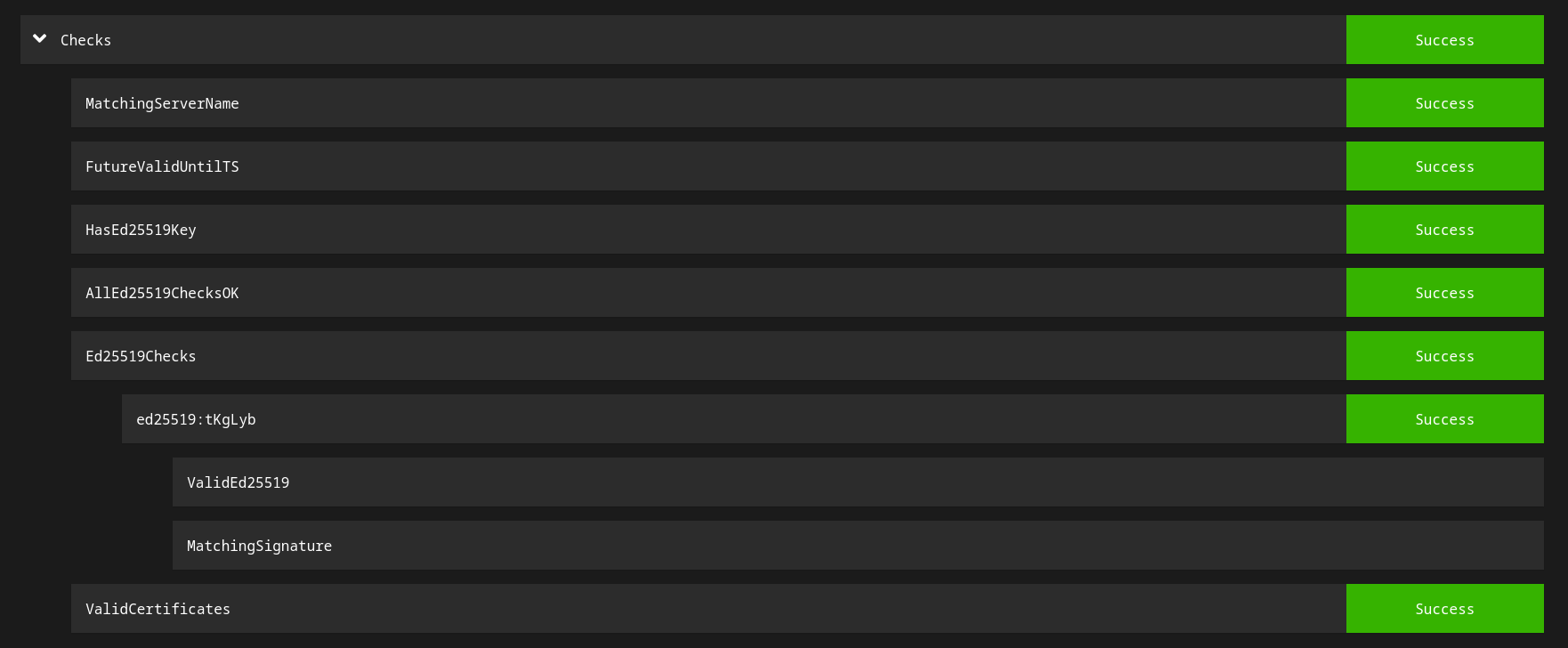
# rcctl start dendriteIf we did everything OK the https://federationtester.matrix.org/ will show something like this:
The client, well there are a lot of them, for all the platforms that exist, in my personal use I like Element on my browser and also as app for my android phone, you can check your own, but those I must say are pretty good and light. You just need to set your domain, user and password.
Job done! We finished it. Now you can get into the Matrix Super Hyper Mega Federation world!, if you get it right and want to contact me you can text me to gonzalo:m.x61.sh and if you want an OpenBSD room you can go to #openbsd:matrix.org if you can't enter, let me know and I will invite you or not.